




The arrival of Microsoft 365 E7 isn’t really about another licensing tier. It’s about a line Microsoft is drawing between how work used to run and how it’s starting to run now – from licensing people for productivity to governing systems that can act on their own.
AI is no longer just helping people work faster. It’s running in the background, moving across systems, and taking action on its own. As that becomes normal, organisations aren’t just managing employees anymore – they’re managing AI agents operating inside their digital environments.
So when leaders ask for Microsoft 365 E7 explained, they’re not looking for a product breakdown. They’re trying to work out how to stay in control as work becomes less human‑led and more system‑driven.
Why Microsoft 365 E7 exists
Microsoft 365 E7 exists because AI has become an active participant in work, not just tool used by employees. Once AI starts operating independently, the risk profile of the organisation changes.
So what actually makes AI different from traditional user‑driven risk? AI systems can:
- access data at scale
- operate autonomously
- influence outcomes without direct user control
At that point, securing users alone is no longer enough. Organisations need governance over AI behaviour itself – not just over people and devices. Microsoft 365 E7 was created to meet that shift, moving enterprise security from protecting user activity to governing autonomous digital actors.
What is Microsoft 365 E7
Microsoft 365 E7 builds on E5 and assumes AI is already embedded into how work happens, bringing Copilot, the full Entra Suite, and governance for AI agents into a single enterprise licence.
How it differs from E5
The real difference between E7 and E5 doesn’t show up in a feature list. It shows up in how organisations manage risk once AI becomes part of how work operates:
1. Scope: Security extends beyond human users to include AI agents acting on the organisation’s behalf.
2. Visibility: AI‑driven actions are observable, traceable, and auditable across systems.
3. Accountability: Responsibility for AI‑influenced outcomes is clearly defined and defensible.
This is where E5 reaches its limit. E5 protects users and data. Microsoft 365 E7 extends that protection to AI agents themselves – treating them as actors that must be governed, not just tools that are used.
The real shift: From user security to AI governance
Enterprise security has always assumed a human is in control. Someone logs in, initiates an action, and remains accountable for the outcome. Identity, device controls, and permissions are built around that model.
That assumption no longer holds. As AI agents become part of how work gets done, organisations face a new class of enterprise risk. To maintain visibility, control, and accountability, leaders need clear answers to questions like:
- What data can AI access right now?
- Can AI‑driven actions be explained and audited if challenged?
- Who is accountable when AI output leads to the wrong outcome?
Microsoft Agent 365: Control as AI Agents Move into Operations
Microsoft Agent 365 is designed to support that shift. It gives IT and security teams a straightforward way to see, manage, and protect AI agents as they become part of normal operations, without introducing a whole new layer of complexity.
It focuses on three practical areas:
1. Observability
A simple view of which agents exist and what they’re doing, so there are no surprises running quietly in the background.
2. Governance
Clear, consistent boundaries around access and responsibility, applied as agents become part of real workflows.
3. Security
Familiar protections extended to AI agents, helping teams stay ahead of issues rather than reacting after the fact.
These capabilities build on tools organisations already know:
- Microsoft Entra for identity and access
- Microsoft Purview for data protection and compliance
- Microsoft Defender for security monitoring
- Microsoft 365 admin centre for central visibility
The role of Copilot in E7
Once Copilot becomes standard, the conversation changes. It’s less about getting tips out of Word or Teams, and more about how it shows up across the business day to day.
What this looks like in everyday use:
1. Regular use: People use Copilot as part of their normal work, not just when it’s promoted or pushed
2. Work impact: Copilot influences how tasks are prioritised and decisions are made, not just document drafts
3. Basic rules: Clear boundaries exist before habits form and usage spreads informally
This is why E7 treats Copilot as infrastructure, not a tool. Once it becomes part of normal work, it needs to be set up and governed like any other core system.
Who should use Microsoft 365 E7
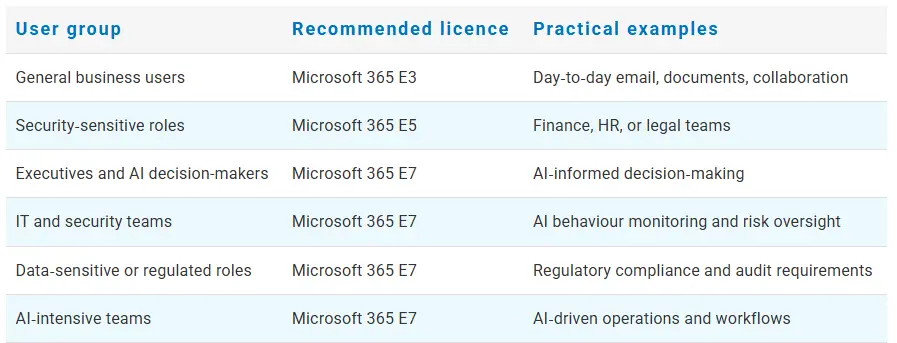
| User group | Recommended licence | Practical examples |
|---|---|---|
| General business users | Microsoft 365 E3 | Day‑to‑day email, documents, collaboration |
| Security‑sensitive roles | Microsoft 365 E5 | Finance, HR, or legal teams |
| Executives and AI decision-makers | Microsoft 365 E7 | AI‑informed decision‑making |
| IT and security teams | Microsoft 365 E7 | AI behaviour monitoring and risk oversight |
| Data‑sensitive or regulated roles | Microsoft 365 E7 | Regulatory compliance and audit requirements |
| AI‑intensive teams | Microsoft 365 E7 | AI‑driven operations and workflows |
How Intelliworx helps

This is where Intelliworx focuses its work. We help organisations decide where stronger AI governance is actually required, design mixed Microsoft 365 licensing strategies aligned to risk, and ensure AI adoption supports security, compliance, and business accountability from day one.
Our role isn’t to push licences. It’s to help you adopt AI with confidence, clarity, and control – before governance becomes a problem you have to unwind.
Frequently Asked Questions
Microsoft 365 E7 is Microsoft’s highest enterprise licence. It builds on E5 and adds embedded Copilot, the full Entra Suite, and governance for AI agents.
E5 focuses on securing users, devices, and data. E7 extends that security model to include AI agents that can act independently.
It depends on how deeply AI is embedded into operations. For organisations scaling AI, E7 helps address governance gaps that E5 doesn’t cover.
E7 is best suited to executives, IT and security teams, and AI‑heavy or regulated roles. Most organisations adopt it selectively.
E7 embeds Copilot by default, reflecting a shift from optional add‑on to standard, governed capability.
It helps organisations see, manage, and protect AI agents as they move into everyday work.
E7 brings AI agents into existing identity, security, and compliance frameworks, so they can scale without losing clarity or oversight.